> ## Documentation Index
> Fetch the complete documentation index at: https://docs.vaultcord.com/llms.txt
> Use this file to discover all available pages before exploring further.
# Passwords — require Invite Code
> Only allow entry through your VaultCord verification when members enter an access code.
## Add Password
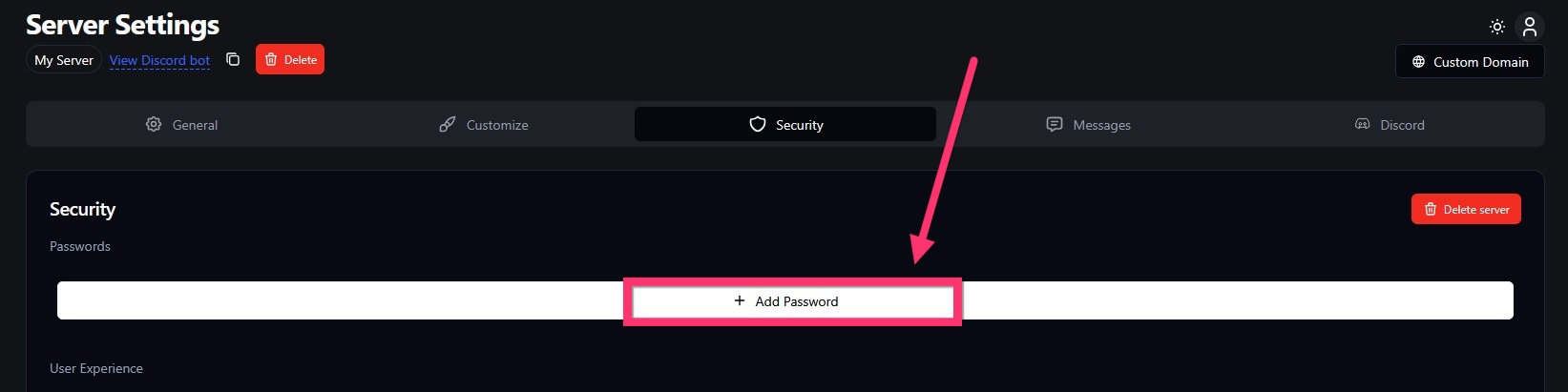
You can add unlimited invite code passwords to your verification page. To do this manually, go to the **Security** tab in your VaultCord server settings and click **Add Password**. (API instructions below.)
 ## Save the invite code
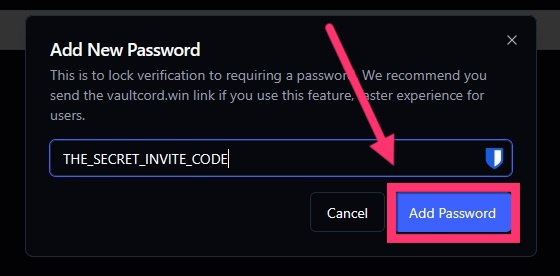
For your invite code (the password), enter any text—preferably 8+ characters and hard to guess. Avoid using words from your server name or branding. Click **Add Password** to save, and create as many codes as you need. Invite codes never expire unless you manually remove them by clicking the X next to a code.
## Save the invite code
For your invite code (the password), enter any text—preferably 8+ characters and hard to guess. Avoid using words from your server name or branding. Click **Add Password** to save, and create as many codes as you need. Invite codes never expire unless you manually remove them by clicking the X next to a code.
 ## API Instructions (automatiion with SellAuth, Sellhub, Paysum)
Click here to see our API documentation for Add Password endpoint.
To give each buyer a unique invite code through SellAuth or another storefront, use [our API endpoint](/api-reference/servers/passwords). With the [webhooks feature](https://developers.paysum.io/api-reference/webhooks) in most quality e-commerce platforms, a purchase can trigger an HTTPS request to your website, which then sends a request to the [VaultCord Password API](https://platform.openai.com/api-reference/servers/passwords).
How do you deliver the invite code? Use [Dynamic product delivery](https://help.paysum.io/en/articles/11452399-how-to-create-product-or-payment-link#h_0914bd98bf) so the e-commerce platform automatically sends the code your website returns to the buyer’s email and checkout page. Alternatively, use details from the webhook (like **Invoice ID** or **Customer Email**) as the invite code you send to VaultCord. Inform buyers in a manual note that their invite code is their invoice number or email address.
Success! Your Discord server is now even more secure from malicious raiding.
If you have any questions, Feel free to join our [Discord Server](https://vaultcord.com/discord) and ask us anything!
## API Instructions (automatiion with SellAuth, Sellhub, Paysum)
Click here to see our API documentation for Add Password endpoint.
To give each buyer a unique invite code through SellAuth or another storefront, use [our API endpoint](/api-reference/servers/passwords). With the [webhooks feature](https://developers.paysum.io/api-reference/webhooks) in most quality e-commerce platforms, a purchase can trigger an HTTPS request to your website, which then sends a request to the [VaultCord Password API](https://platform.openai.com/api-reference/servers/passwords).
How do you deliver the invite code? Use [Dynamic product delivery](https://help.paysum.io/en/articles/11452399-how-to-create-product-or-payment-link#h_0914bd98bf) so the e-commerce platform automatically sends the code your website returns to the buyer’s email and checkout page. Alternatively, use details from the webhook (like **Invoice ID** or **Customer Email**) as the invite code you send to VaultCord. Inform buyers in a manual note that their invite code is their invoice number or email address.
Success! Your Discord server is now even more secure from malicious raiding.
If you have any questions, Feel free to join our [Discord Server](https://vaultcord.com/discord) and ask us anything!