> ## Documentation Index
> Fetch the complete documentation index at: https://docs.vaultcord.com/llms.txt
> Use this file to discover all available pages before exploring further.
# Enable Server Alerts
> Follow the steps below to receive alerts when your servers get deleted, nuked, raided, etc so you can recover it as soon as possible.
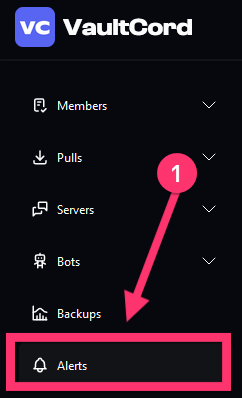
> On the main dashboard page, [click **Alerts.**](https://dash.vaultcord.com/alerts)
 > Click the **Create Alerts** button.
 >
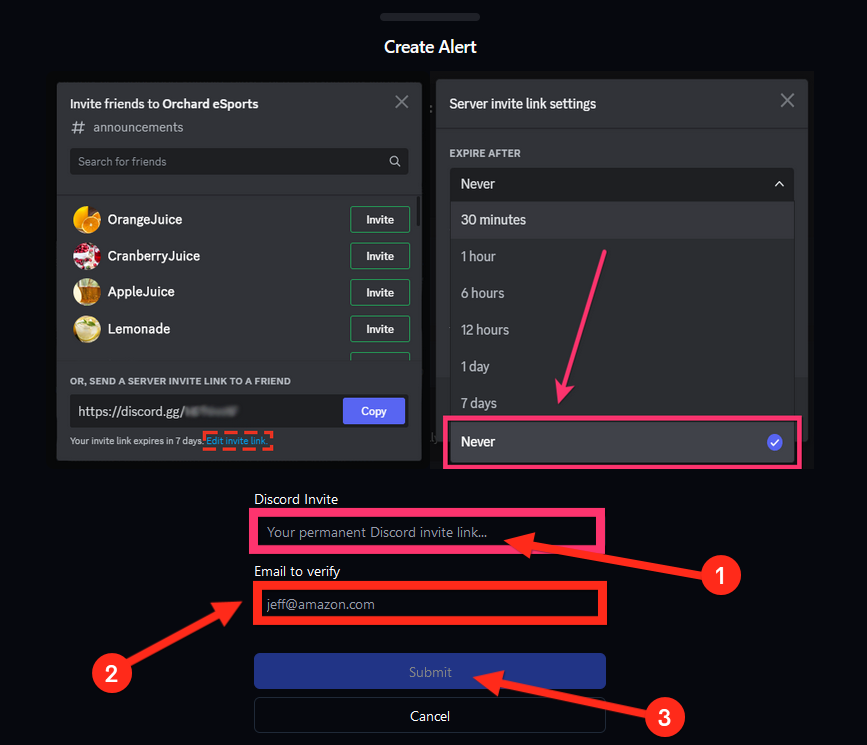
> Enter a permanent **Discord Invite** and the email to send the alerts to. Once you have done that please press submit.
>
> Enter a permanent **Discord Invite** and the email to send the alerts to. Once you have done that please press submit.
 >
Success! Now you will be emailed if your server gets deleted, nuked, raided, etc.
>
Now, learn how to make VaultCord auto pull members after your server is deleted.
If you have any questions, feel free to join our [Discord Server](https://vaultcord.com/discord) and ask us anything!
>
Success! Now you will be emailed if your server gets deleted, nuked, raided, etc.
>
Now, learn how to make VaultCord auto pull members after your server is deleted.
If you have any questions, feel free to join our [Discord Server](https://vaultcord.com/discord) and ask us anything!