> ## Documentation Index
> Fetch the complete documentation index at: https://docs.vaultcord.com/llms.txt
> Use this file to discover all available pages before exploring further.
# Add a Server
> Step-by-step guide for adding a Server to VaultCord.
> Please [click here](https://dash.vaultcord.com/servers/add) to [add server](https://dash.vaultcord.com/servers/add) to VaultCord.
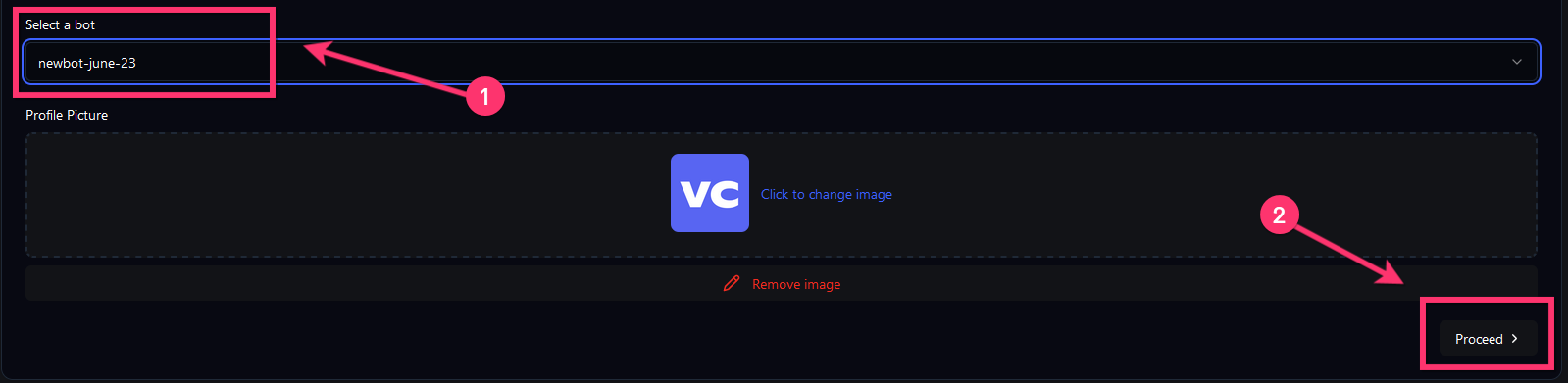
> Select your Discord bot.
 >
Make sure to close the popup windows after inviting the bot!
> After inviting the bot, select Discord server to use.
>
Make sure to close the popup windows after inviting the bot!
> After inviting the bot, select Discord server to use.
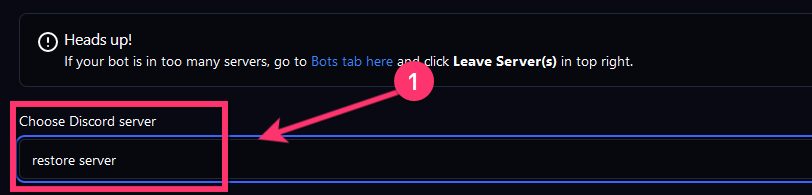 >
Feel free to change the server name to anything you want, that name will be shown on the verify page.
> Drag the integrated bot role (SAME name as the Bot) ABOVE the verified role
>
Feel free to change the server name to anything you want, that name will be shown on the verify page.
> Drag the integrated bot role (SAME name as the Bot) ABOVE the verified role
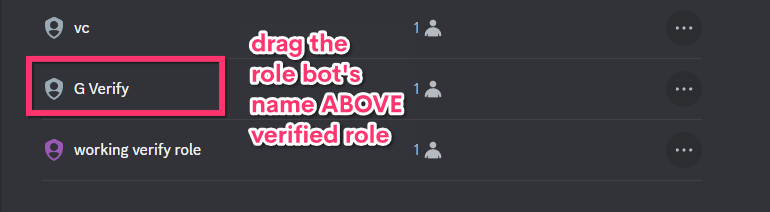 >
Make sure to move the role with the bot's name, giving your bot a "Bots" role does **not** work.
> (Optional) Choose a role you want your members to receive after verification.
>
Make sure to move the role with the bot's name, giving your bot a "Bots" role does **not** work.
> (Optional) Choose a role you want your members to receive after verification.
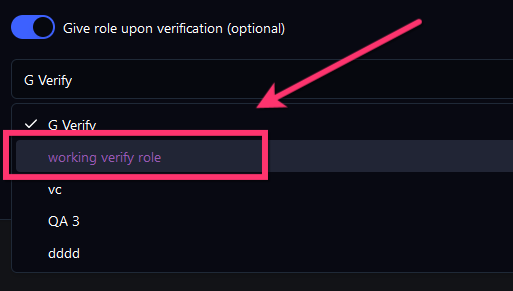 >
If your roles do NOT show then make sure that the integrated bot role is **above** the verified role. New role? **Uncheck & Recheck** the "Give Role" checker to refresh the roles list.
You have successfully added your server to VaultCord.
If you have any questions, join our [Discord Server](https://vaultcord.com/discord) and ask us anything!
>
If your roles do NOT show then make sure that the integrated bot role is **above** the verified role. New role? **Uncheck & Recheck** the "Give Role" checker to refresh the roles list.
You have successfully added your server to VaultCord.
If you have any questions, join our [Discord Server](https://vaultcord.com/discord) and ask us anything!